Variables
Variables can be used in various parts of GSA, like Tasks, Shop packs, Supporter Tiers, Blueprints Discord Slash commands and Discord Emoji reactions.
Variables are used to dynamically include details such as a character name, username, ID, and more.
Working on blueprints? Then you can find more variables in the Blueprints documentation.
If your commands or variables aren't working, check out this troubleshooting guide:
https://docs.gameserverapp.com/dashboard/monetization/deliveries#-troubleshooting-
Players
Player ID
{player.id} Displays the player's unique ID (Steam, Epic, EOS, Mojang, etc).
Username
{player.username} Displays the player's username.
Alternatively, use {player.name}.
Token count
{player.token_count} Displays the player's current token balance.
Custom Role
{custom_role.1.minutes_remaining} shows the remaining time in minutes.
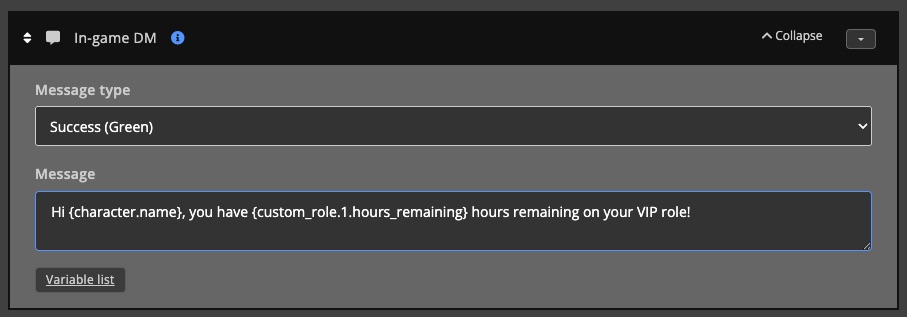
{custom_role.1.hours_remaining} shows the remaining time in hours.
{custom_role.1.days_remaining} shows the remaining time in days.
Character
Character ID
{character.id} Displays the in-game character ID.
Character name
{character.name} Displays the in-game character name.
Group
Group ID
{group.id} Displays the in-game group ID.
Group name
{group.name} Displays the in-game group name.
Game server
Game server name
{gameserver.name} Displays the server's name as it appears in the list.
Game server short name
{gameserver.short_name} Displays the server's short name.
Website name
{gameserver.website_name} Displays the server's website name.
Online player count
{gameserver.online_player_count} Displays the number of currently online players.
Cluster
Cluster name
{cluster.name} Displays the name of the cluster.
Online player count
{cluster.123.online_player_count} Displays the number of currently online players.
You can find the complete variable, with the right ID, for each cluster on the cluster page (bottom right).
Online servers count
{cluster.123.online_servers_count} Displays the number of currently online servers.
You can find the complete variable, with the right ID, for each cluster on the cluster page (bottom right).
Online slots count
{cluster.123.online_slots_count} Displays the number of currently online slots.
You can find the complete variable, with the right ID, for each cluster on the cluster page (bottom right).
Dashboard
All dashboard count variables are cached for 4 minutes.
Online player count
{dashboard.online_player_count} Displays the number of currently online players.
Online servers count
{dashboard.online_servers_count} Displays the number of currently online servers.
Online slots count
{dashboard.online_slots_count} Displays the number of currently online slots.
Task
The variables below are only available for Tasks.
Last run datetime
{task.123.last_run_datetime} Displays the last run date and time.
This variable is only available for scheduled tasks, you can find the complete variable for each task on the task page (bottom right).
Next run datetime
{task.123.next_run_datetime} Displays the next run date and time.
This variable is only available for scheduled tasks, you can find the complete variable for each task on the task page (bottom right).
Minutes until run
{task.123.minutes_until_run} Displays the number of minutes until the next run.
This variable is only available for scheduled tasks, you can find the complete variable for each task on the task page (bottom right).
Hours until run
{task.123.hours_until_run} Displays the number of hours until the next run.
This variable is only available for scheduled tasks, you can find the complete variable for each task on the task page (bottom right).
Days until run
{task.123.days_until_run} Displays the number of days until the next run.
This variable is only available for scheduled tasks, you can find the complete variable for each task on the task page (bottom right).
Diff for humans
{task.123.diff_for_humans} Displays the time difference until the next run in a human-readable format.
This variable is only available for scheduled tasks, you can find the complete variable for each task on the task page (bottom right).
Delivery
Delivery variables are used to dynamically include details about the delivery.
Delivery ID
{delivery.id} Displays the delivery's unique ID.
Delivery status
{delivery.status} Displays the delivery's current status.
Shop pack variables
The variables below are only available for Shop pack deliveries.
Purchase quantity
{variable.purchase_quantity} Displays the purchase quantity, when applicable.
Purchase date
{variable.purchase_date} Displays the purchase date.
Purchase amount
{variable.purchase_amount} Displays the purchase amount.
Purchase currency
{variable.purchase_currency} Displays the purchase currency.
Transaction description
{variable.transaction_description} Displays the transaction description.
Item name
{variable.item_name} Displays the item name.
Supporter tier variables
The variables below are only available for Supporter tier deliveries.
Purchase date
{variable.purchase_date} Displays the purchase date.
Purchase amount
{variable.purchase_amount} Displays the purchase amount.
Purchase currency
{variable.purchase_currency} Displays the purchase currency.
Purchase type
{variable.purchase_type} Displays the purchase type.
Gateway
{variable.gateway} Displays the gateway.
Gateway reference ID
{variable.gateway_refid} Displays the gateway reference ID.
Item name
{variable.item_name} Displays the item name.
Slash command variables
The variables below are only available for Discord slash command deliveries.
Discord user ID
{variable.discord_user_id} Displays the delivery's Discord user ID. This is only available for commands where you select a Discord user.
Access group ID
{variable.access_group_id} Displays the delivery's access group ID.
Membership type
{variable.membership_type} Displays the delivery's membership type.
Amount
{variable.amount} Displays the amount.
Countdown minutes
{variable.countdown_minutes} Displays the countdown duration in minutes.
Duration
{variable.duration} Displays the duration.
Message
{variable.message} Displays the message.
Rcon command
{variable.rcon_command} Displays the rcon command.
Reason
{variable.reason} Displays the reason.
Variables for specific actions
Send tokens
{variable.send_tokens.amount}Displays the amount of tokens that were sent.